¶ Software & Firmware
Download the latest software and firmware for your E-Power system. Select the section that matches your system configuration.
¶ Software Versions
Not sure which version to choose? Return to E-Power System to identify your hardware.
¶ Standard Update (v3.x)
For: Systems already running Software v3.x with the Integrel Touchscreen.
Video: How to update Integrel E-Power software over Wi-Fi
¶ Downloads
| Software | Version | Platform | Download |
|---|---|---|---|
| Integrel Configurator | v1.9.9 | Windows™ 10/11 | Download (.exe) |
| Integrel Configurator | v1.9.9 | MacOS | Coming Soon |
| Integrel Configurator | v1.8.3 | Windows™ 10/11 | Download (.exe) |
| E-Power Firmware (latest) | v3.1.35 | Integrel Wireless Display | Download (.pkg) |
Which Configurator version? Use 1.9.9 for v3.x firmware and 1.8.3 for v2.2 firmware. For firmware older than v2.2, contact support.
¶ Update Procedure
¶ Before You Begin
- Safety. Only perform updates while docked or anchored—never underway.
- Connection. Maintain laptop connection throughout the process.
- Power. Do not power-off the E-Power system during the update.
¶ Dual Controller Systems
- Power OFF one of the Controllers prior to commencing the update process.
- Update the powered Controller by following the Step-by-Step process below.
- Power ON the second Controller.
- The second Controller automatically updates to the new version.
¶ Step-by-Step Instructions
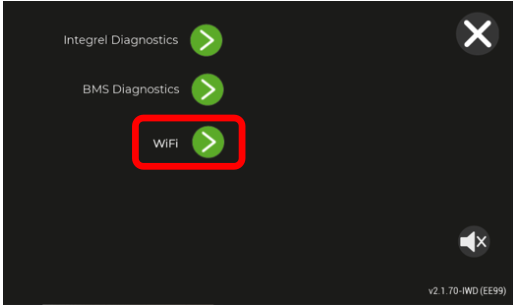
Step 1. Enable Wi-Fi on the Display
Navigate to Settings → Advanced → Wi-Fi on the touchscreen.
Step 2. Connect Your Laptop
- Network name:
IntegrelorIntegrel-XXXX - Password:
cornwall
Step 3. Push the Update
- Open Integrel Configurator on your laptop.
- Click the Touchscreen tab.
- Select the update function and choose the
.pkgfile.
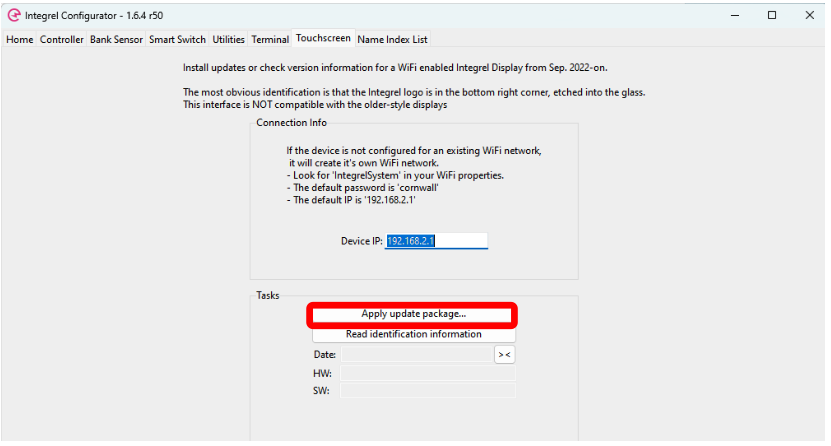
- The system will upload, reboot, and apply changes.
¶ Migration: v2.x to v3.x
For: Systems with the Integrel Wireless Display (WiFi touchscreen) running v2.x software, upgrading to v3.x. Not for Parker PHD screens (see Legacy section below).
⛔ STOP: Parker PHD Display Users
If you have a Parker PHD Display (black bezel, no Integrel logo), this update is NOT compatible. Use Legacy Software instead.
⚠️ Safety Warning
- Perform in a safe location with internet access.
- Allow 30–45 minutes.
- Power loss during update may require factory reset.
¶ Software Downloads
| Software | Version | Download |
|---|---|---|
| Integrel Configurator | v1.8.3 | Download (.exe) Windows™ |
| Migration Package (v2→v3) | v3.0.84 | Download (.pfw) |
| E-Power Firmware (latest) | v3.1.35 | Download (.pkg) |
The Migration Package bundles the Touchscreen firmware (PFW 1113) and the v3.0.84 system software in one file. It updates the screen and the system in a single process; no separate screen update is needed.
Which Configurator version? Use Configurator 1.8.3 to send the Migration Package to any system running v2.x software. Configurator 1.8.3 also completes Step 3, so you do not need 1.9.9 to finish this migration. After the migration, use Configurator 1.9.9 for all future updates.
¶ Step 1: Prepare the System
- Power on the Integrel system.
- Ensure engines are stopped.
- Enable the Touchscreen Wi-Fi hotspot: Settings → Advanced → Wi-Fi
- Connect your laptop directly to the Touchscreen hotspot:
- Network name:
IntegrelorIntegrel-XXXX - Password:
cornwall
- Network name:
¶ Step 2: Install the Migration Package
- Open Integrel Configurator v1.8.3.
- Go to Touchscreen tab → Update Firmware.
- Change file type dropdown from "PKG" to "PFW".
- Select the E-Power Migration Package file (
.pfw) and upload.
Two-Stage Update Process
The Controller updates twice automatically:
- Stage 1: Prompt for v1.200 → Tap Proceed
- Stage 2: Prompt for v1.201+ → Tap Proceed
Warning: Do not power off the Integrel system during the update process!
¶ Step 3: Update to the Latest v3 Software
Complete this step only after the Migration Package has finished on every Controller (the system now runs v3.0.84).
- Open Integrel Configurator (v1.8.3 or v1.9.9).
- Go to Touchscreen tab → Update Firmware.
- Leave the file type dropdown set to "PKG".
- Select the E-Power Firmware (latest) file (
.pkg) and upload. - The system will upload, reboot, and apply changes.
¶ USB Fallback (If Wi-Fi Fails)
- For Step 2, rename the Migration Package file to
integrel.pfw. For Step 3, keep the.pkgfile extension; the file name does not matter. - Copy to root of USB flash drive (formatted using FAT32 filesystem).
- Switch off Integrel Controllers
- Insert USB stick into back of Touchscreen.
- Power on one Integrel Controller.
- Watch the Touchscreen display and acknowledge updates by tapping the green button.
- When updates have completed, power on the second Controller (if present) and confirm the update completes successfully.
¶ Legacy Software (v2.x)
ONLY FOR: Systems with Parker PHD50 Display (locked to software version v2.x).
⚠️ Limitations
- Can NOT be upgraded to v3.x software.
- Must update via USB flash drive (no Wi-Fi).
¶ Downloads
| Software | Version | Download |
|---|---|---|
| Parker PHD50 Update | v2.2 | Download (.recovery) |
¶ USB Update Instructions
The Configurator tool is NOT required for legacy updates.
¶ Step 1: Prepare the USB Flash Drive
- Capacity: Smaller than 4GB recommended
- Format: FAT32 only (not exFAT or NTFS)
- Filename: Rename the downloaded file to exactly:
factory_erase.recovery - Location: Copy to root of USB flash drive (not inside any folder)
¶ Step 2: Install the Update
- Turn on the Integrel system.
- Wait for the Parker display to power on completely.
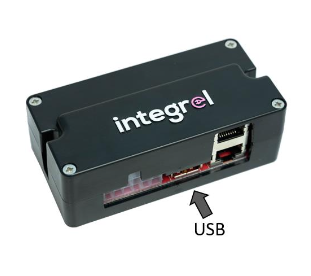
- Insert USB flash drive into the screen interface box (shown below).
- Wait for the update to complete (screen may blank or show progress).
- Do not remove power until the system reboots and shows the normal user interface (dials or gauges).
- Remove USB flash drive after completion.
¶ USB Troubleshooting
| Issue | Solution |
|---|---|
| Screen ignores USB | Verify filename is exactly factory_erase.recovery |
| USB not detected | Use a USB flash drive smaller than 16GB; ensure FAT32 format |
| Stuck on popup | Tap bottom-left corner 5 times to dismiss |