Integrel E-Power is an advanced energy generation and management system designed for marine vessels. This page helps you identify your system type and navigate to the appropriate documentation.
¶ Identify Your System
To ensure you access the correct software and documentation, identify your system based on the screen and controller combination.
Version Numbers Explained
- Hardware versions (v4, v5) refer to the version of the Controller circuit board.
- Software versions (v2.x, v3.x) refer to the version of the E-Power system package.
- It is normal for Hardware v5 to run Software v3.x.
¶ Step 1: Identify Your Screen
| Screen Type | Platform | Capabilities |
|---|---|---|
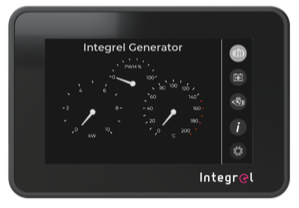 Integrel Wi-Fi Touchscreen Integrel logo in bottom corner |
Current Platform | Runs Software v3.x. Proceed to Step 2. |
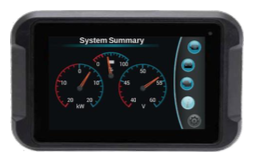 Parker PHD Display Black bezel, no Integrel logo |
Legacy Platform | Locked to Software v2.x. Cannot upgrade to v3.x. |
¶ Step 2: Identify Your Controller (Current Platform Only)
If you have the Integrel Touchscreen, check the version of your Controller by examining the connector on the bottom of the unit.
¶ Version 4 Controller (Square Molex Connector)
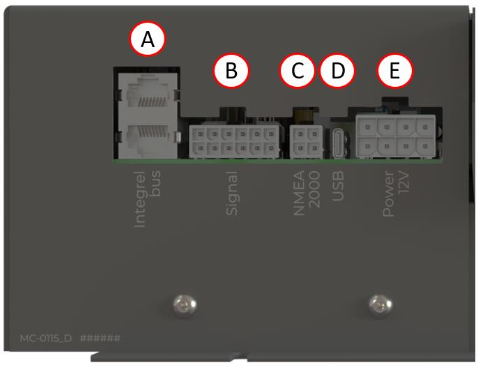
| Connector | Square Molex plug for NMEA 2000 and Battery BMS; ("C") in the picture |
| Software | Can upgrade from v2.x to v3.x via Migration Guide |
| Manual | Installation Manual 2024 v5.4 |
¶ Version 5 Controller (Round M12 Connector)
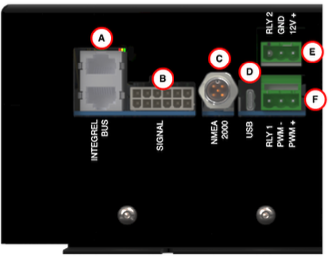
| Connector | Round M12 NMEA 2000 connector ("C" in the picture) |
| Software | Native v3.x platform, Use Standard Update |
| Manual | Installation Manual 2026 v6.1 |
¶ Documentation
| Section | Description |
|---|---|
| Software & Firmware | Download updates, migration guides, and legacy software |
| Manuals | Installation guides, user manuals, and technical documentation |
| Configuration | System settings, parameters, and calibration |
| Troubleshooting | Common issues, diagnostics, and system resets |
| Customer Support | Step-by-step guide for getting help with your system |
Need Help? Follow our Customer Support guide or contact support@integrelsolutions.com